Category: Engineering

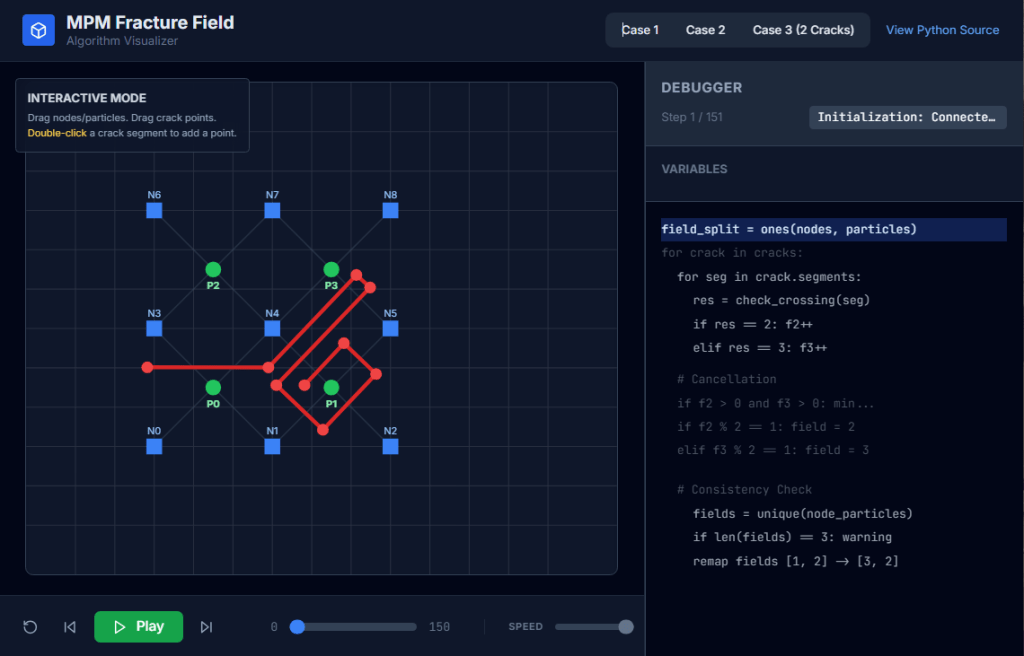
  • MPM fracture CRAMP – Line crossing algorithm visualizer

    MPM fracture CRAMP – Line crossing algorithm visualizer

    Check my github: MPM Field Visualizer

    Line Crossing Algorithm:

    The most time consuming, new calculation required for CRAMP is the linecrossing calculation in Task 2. It is important for this calculation to be optimal and precise. The only numerical difficulty occurs when a node lies very close to the crack path. In some line-crossing algorithms, numerical round off in this situation could result in two particles on the same side of the crack being labeled as being on opposite sides. The complementary problem of when a material point lines very close to a crack path never occurs because the contact methods keep particles from reaching the crack path.

    A line-crossing algorithm in 2D based on signed areas of certain triangles solved the problem of nodes on cracks. For any three points, x1, x2, and x3, the signed area of the triangle with those vertexes is given by

    Area = x1(y2−y3)+x2(y3−y1)+x3(y1−y2) (33)

    This area is positive if the path from x1 to x3 is counter clockwise, negative if it is clockwise, and zero if the points are collinear. Using this signed area, the algorithm is as follows:

    Subtask 1:

    Before doing any calculations, determine if the rectangle defined by the particle (x1 = xp) and the node (x2 = xn) under consideration intersects the extent of the segment endpoints in the crack. If it does not, the line does not cross the crack and rest of the algorithm can be skipped for that crack.

    Subtask 2:

    For each crack segment with endpoints x3 and x4, calculate the sign of the areas of triangles (123), (124), (341), and (342) denoted as “+”, “−” or “0”.

    Subtask 3:

    The particle is above the crack if the signs are (−++−), (−++0), (0++0), or (−0+0). The first case is the most common; the other three correspond to the node being on the crack segment, on the start point of the crack segment, or on the end point of the crack segment, respectively. The cases where the material point is on the crack segment can be ignored. Similarly, the particle is below the crack if the signs are (+−−+), (+−−0), (0−−0), or (+0−0). All other combinations of signs indicate the line does not cross the line segment. In practice, many signed area calculations can be skipped. For example is the signs of (123) and (124) are (++), there is no need to evaluate the signs of (341) and (342) because the line can not cross the segment.

    Subtask 4:

    One complication is that a given xp to xn line might cross more than one segment in a single crack. In this situation, the crossing is ignored unless there are an odd number of crossings. To include this possibility, the previous two steps must check all segments in a crack before deciding if there is a crossing, but if Subtask 1 finds no intersection, the check for all segments in that crack can be skipped.

    — Nairn (2003)

    Particle-crack posision check:
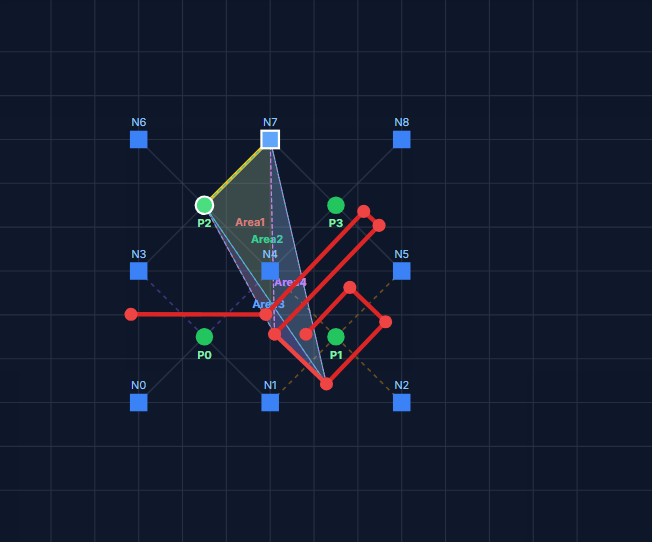
    Node-crack stability check. (Sub stack 4)

    <p id="<reference>Nairn-JA.-Material-point-method-calculations-with-explicit-cracks.-Comput-Model-Eng-Sci-2003;4:649–64.References:

    Nairn JA. Material point method calculations with explicit cracks. Comput Model Eng Sci 2003;4:649–64.

    Tito Adibaskoro, Stéphane Bordas, Wojciech T. Sołowski, Simo Hostikka,
    Multiple discrete crack initiation and propagation in Material Point Method, Engineering Fracture Mechanics, Volume 301, 2024, 109918, ISSN 0013-7944, https://doi.org/10.1016/j.engfracmech.2024.109918.

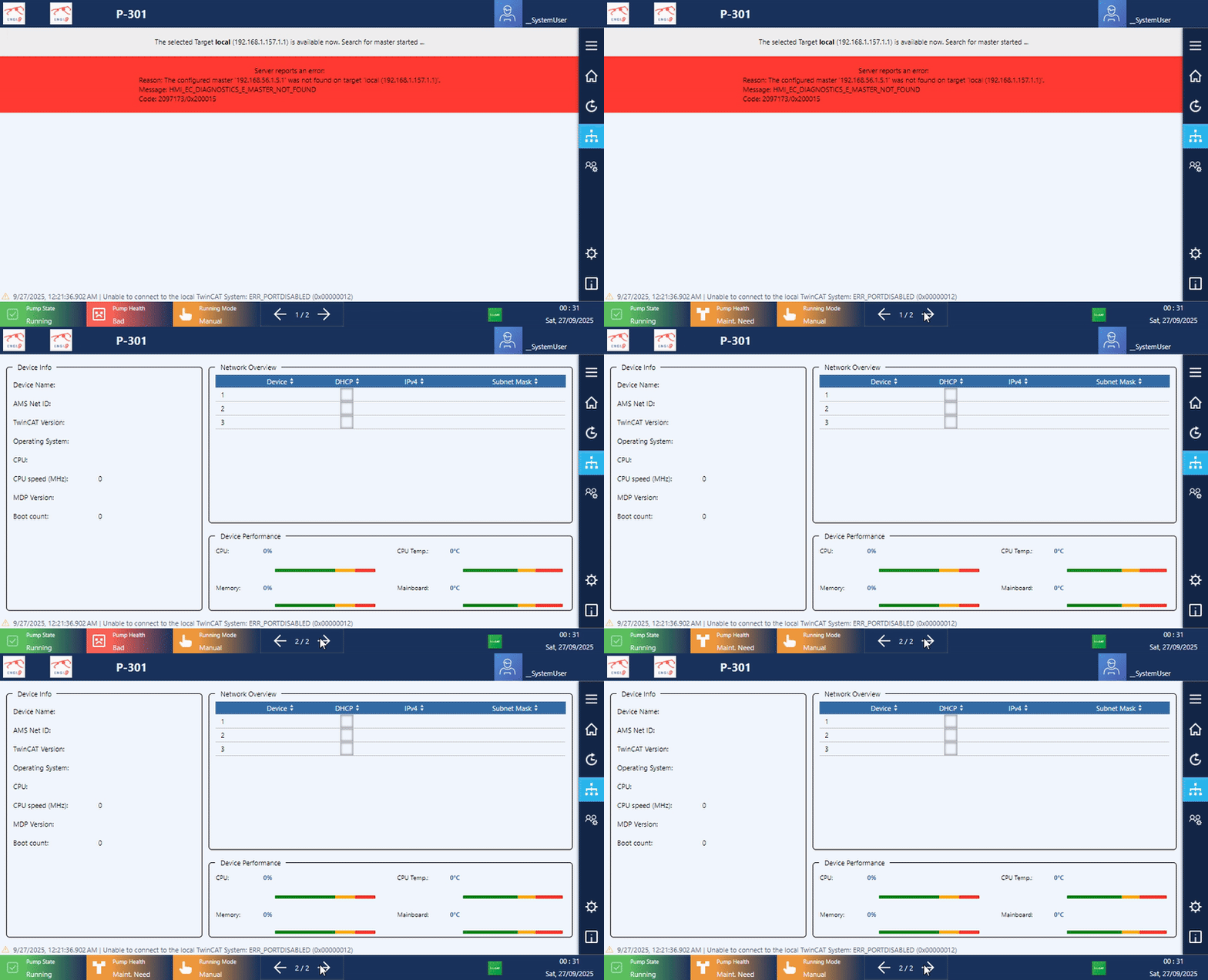
  • TcHMI show case of a Vibration monitoring system

    A turbine pump using analogue sensors for winding and bearing temperature, keyphasor for rotating speed and velocity sensors for vibrating. The program is an implementation of TE2000 and TwinCAT 3, with custom Fourier function (just in case the sensors are not RMS).

    Go around main pages:

    Component detail value and data can be monitored / modified quickly via pop-up.

    Other features:

    Some features only work on real hardware. Video of working HMI on-site is prohibited.

    Source: https://github.com/KowalskiPi/Tc3_VN001007_VMS

  • The first installation of TC/BSD on touch panel Embeded IPC, TcHmi TF2000 and Client

    Hardware info

    CP6706-0001-0050
    Display size/resolution	7" 800 x 480
    Touch screen		single-finger touch screen
    Processor		Intel Atom® E3827, 1.75 GHz, 2 core
    Memory			8GB DDR3L RAm
    Hard disks/flash	40 GB CFast
    Interfaces		4 x USB 2.0, 1 x DVI
    Power supply		24 V DC

    Install X environments

    // Install Xorg
    $ pkg install xorg
    
    // Add a user into video user group
    $ doas pw groupmod video -m Aministrator
    
    // Get VGA info
    $ pciconf -lv|grep -B4 VGA
    // return: "Intel"...
    
    // Get input devices info
    // In X terminal
    $ doas libinput list-devices 
    // return: ELO Touch input device "dev/input/event3"


    Pass these generated info into config files.

    Install GUI windows

    // Unblock FreeBSD reposity
    $ doas ee /usr/local/etc/pkg/repos/FreeBSD
    $ >> FreeBSD: ( enable: yes )
    
    // Install openbox
    $ doas pkg install openbox
    
    // Install lightdm
    $ doas pkg install lightdm lightdm-gtk-greeter
    
    // Install on-screen keyboard to input password at hello screen
    $ doas pkg install florence
    
    $ doas ee /usr/local/etc/lightdm/lightdm.conf
    $ >> xserver-command=X -nocursor
    
    $ doas ee /usr/local/etc/lightdm/lightdm-gtk-greeter.conf
    $ >> keyboard= florence --focus
    $ >> keyboard-position= "75%,center -0;50%, 25%"
    
    // Follow config file to enable auto start boot into GUI instead of terminal environment
    

    Config files

    /usr_local_etc_X11_xorg.conf.d

    • 10-intel.conf.txt
    Section "Device"
            Identifier      "Card0"
            Driver          "modesetting"
    EndSection
    Section "Monitor"
            Identifier      "HDMI-2"
            VendorName      "ELOTouch"
            ModelName       "Monitor0Model"
            Option          "DPMS" "false"
    EndSection
    Section "Screen"
            Identifier      "Screen0"
            Device          "Card0"
            Monitor         "HDMI-2"
            SubSection      "Display"
            Modes           "800x480"
            EndSubSection
    EndSection
    Section "InputClass"
            Identifier "touchpad"
            MatchIsTouchPad "on"
            Driver  "libinput"
            Option  "Tapping" "on"
            Option  "NaturalScrolling"      "on"
    EndSection
    Section "InputClass"
            Identifier      "touchScreen"
            MatchIsTouchscreen      "on"
            Driver  "libinput"
            Option  "Device" "/dev/input/event3"
    EndSection
    Section "Files"
            FontPath "/usr/local/share/fonts/urwfonts/"
            FontPath "/usr/local/share/fonts/TrueType/"
    EndSection

    /boot/loader.conf.txt

    kern.geom.label.disk_ident.enable="0"
    kern.geom.label.gptid.enable="0"
    cryptodev_load="YES"
    zfs_load="YES"
    hint.attimer.0.clock="0"
    cuse_load="YES"
    hw.psm.synaptics_support=1
    usbhid_load="yes"
    hw.usb.usbhid.enable=1
    kldload i915kms
    hw.vga.textmode=1
    fdescfs_load="yes"

    /etc

    • fstab.txt
    do# Device                Mountpoint      FStype  Options         Dump    Pass#
    /dev/gpt/efiboot0               /boot/efi       msdosfs rw              2       2
    /dev/ada0p2             none    swap    sw              0       0
    proc                    /proc           procfs  rw              0       0
    fdescfs                 /dev/fd         fdescfs rw              0       0
    • rc.conf.txt
    #fonts_setting----------
    allscreens_flags="-f vgarom-thin-8x16"
    #####################
    zfs_enable="YES"
    dumpdev="AUTO"
    CXID_enable="YES"
    MDPService_enable="YES"
    ntpd_enable="YES"
    pf_enable="YES"
    TcSystemService_enable="YES"
    runonce_enable="YES"
    sendmail_enable="NO"
    sendmail_submit_enable="NO"
    sendmail_outbound_enable="NO"
    sendmail_msp_queue_enable="NO"
    dhcpcd_enable="YES"
    #ifconfig_igb0="inet 192.168.137.137 netmask 255.255.255.0"
    #defaultrouter="192.168.137.1"
    #ifconfig_igb1="dhcp"
    #dhcpcd_flags="--waitip --denyinterfaces igb0"
    dhcpcd_flags="--waitip"
    allscreens_kbdflags="-b quiet.off"
    syslogd_flags="-ss"
    devfs_system_ruleset="allow_usb_mount"
    hostname="CP-5B3CCE"
    
    #DAEMONS----------------------------
    zfs_enable="YES"
    #moused_enable="YES"
    webcamd_enable="YES"
    dbus_enable="YES"
    kld_list="i915kms"
    #gdm_enable="YES"
    lightdm_enable="yes"
    
    #RemoteDesktop----------------------
    sshd_enable="yes"
    xrdp_enable="yes"
    xrdp_sessman_enable="yes"
    
    #gateway_enable="true"
    
    #TcHmi------------------------------
    TcHmiSrv_enable="YES"
    • ttys.txt
    # name  getty                           type    status          comments
    #
    console none                            unknown off secure
    #
    ttyv0   "/usr/libexec/getty Pc"         xterm   onifexists secure
    # Virtual terminals
    //....existing ttyv
    ttyv8   "/usr/local/bin/xdm -nodaemon"  xterm   onifexists secure

    Enable TF2000

    // Install and enable HMI service
    $ doas pkg install TF2000-HMI-Server
    
    // Unblock firewall
    $ doas service pf stop
    
    $ doas ee /etc/pf.conf
    $ >> pass in quick proto tcp to port 0000 keep state
    $ >> pass in quick proto tcp to port 1010 keep state
    $ >> pass in quick proto tcp to port 1020 keep state
    $ >> pass in quick proto tcp to port 8080 keep state
    
    $ doas service pf start
    
    // Enable HMI service
    $ doas service TcHmiSrv start
    
    /// Remember add this line to rc.conf file above
    /// >> TcSystemService_enable="YES"
    
    /// Remember add this line to fstab.txt file also
    /// >> /dev/gpt/efiboot0               /boot/efi       msdosfs rw              2       2
    /// >> /dev/ada0p2             none    swap    sw              0       0
    
    // Install and config SQLite server
    $ doas pkg install sqlite
    
    // Change directory to
    $ cd /usr/local/etc/TwinCAT/Functions/TF2000-Hmi-Server/service/TcHmiProject
    // Change sqlite database as you like
    $ doas sqlite storage.db
    ...
    

    Install Firefox and enable kiosk mode to boot to HMI

    // Install firefox
    $ doas pkg install firefox
    
    // Edit autostart file
    $ doas ee /home/SystemUser/.config/openbox/autostart.sh
    $ >> 
    $ >> #!/bin/sh
    
    $ >> firefox --kiosk --private-window localhost:1010
    $ >> xset dpms 0 0 0
    $ >> xset s noblank
    $ >> xset s off
    
    // Run
    $ chmod +x /home/SystemUser/.config/openbox/autostart.sh

    Reposity

    See more at: