Tag: Python

  • Custom Python Scripts for AutoCAD Plant 3D – Case study of tubing fittings – SCRIPT

    from varmain.primitiv import *
    from varmain.custom import *
     
    @activate(Group="Coupling", TooltipShort="Tube Male Connector TubexMPT", TooltipLong="Tube Male Connector TubexMPT", FirstPortEndtypes="P", LengthUnit="in",  Ports="2")
    @group("MainDimensions")
    @param(D=LENGTH, TooltipShort="Tube OD", TooltipLong="Tube OD")
    @param(D1=LENGTH, TooltipShort="Hex head OD", TooltipLong="Fitting hex head OD")
    @param(D31=LENGTH, TooltipShort="Hex OD of Body", TooltipLong="Hex OD of Body")
    @param(L=LENGTH, TooltipShort="Length of Fitting", TooltipLong="Overall Length of Fitting")
    @param(L31=LENGTH, TooltipShort="Tube gland", TooltipLong="Tube gland length")
    @param(I1=LENGTH, TooltipShort="Tube insert", TooltipLong="Tube insert distance")
    @param(OF=LENGTH0)
     
    #(arxload "PnP3dACPAdapter")
    #(testacpscript "maleConnector")
    def maleConnector(s, D=0.25, D1=0.5625, D31=1.0625, L=1.82, L31=0.6, I1=0, K=1, OF=0, **kw):
        #length
        L32 = L31*0.6 #adjusting the length of hex head
        L33 = L - L31 #adjusting the length of hex head
        L1 = 0.2 #adjusting the length of body
           
        #hex head
        headStartangle = 0
        headBox1 = BOX(s, L=D1, W=D1, H=L32).translate((L32/2,0,1.866*D1/2)).rotateX(headStartangle) #cos(30deg) = 0.866
        headBox2 = BOX(s, L=D1, W=D1, H=L32).translate((L32/2,0,1.866*D1/2)).rotateX(headStartangle+60) #cos(30deg) = 0.866
        headBox3 = BOX(s, L=D1, W=D1, H=L32).translate((L32/2,0,1.866*D1/2)).rotateX(headStartangle+2*60) #cos(30deg) = 0.866
        headBox4 = BOX(s, L=D1, W=D1, H=L32).translate((L32/2,0,1.866*D1/2)).rotateX(headStartangle+3*60) #cos(30deg) = 0.866
        headBox5 = BOX(s, L=D1, W=D1, H=L32).translate((L32/2,0,1.866*D1/2)).rotateX(headStartangle+4*60) #cos(30deg) = 0.866
        headBox6 = BOX(s, L=D1, W=D1, H=L32).translate((L32/2,0,1.866*D1/2)).rotateX(headStartangle+5*60) #cos(30deg) = 0.866
        headBox1.uniteWith(headBox2)
        headBox1.uniteWith(headBox3)
        headBox1.uniteWith(headBox4)
        headBox1.uniteWith(headBox5)
        headBox1.uniteWith(headBox6)
        headBox2.erase()
        headBox3.erase()
        headBox4.erase()
        headBox5.erase()
        headBox6.erase()
    
        head1 = CYLINDER(s, R=D1/2, H=L32, O=0).rotateY(90)
        head1.subtractFrom(headBox1)
        headBox1.erase()
    
        #body create
        bodyMain = CYLINDER(s, R=0.8*D1/2, H=L, O=0).rotateY(90)
    
        # hex head second
        head2Startangle = 0
        head2Box1 = BOX(s, L=D31, W=D31, H=L33*0.2).translate((L33*0.2/2+L31,0,1.866*D31/2)).rotateX(head2Startangle) #cos(30deg) = 0.866
        head2Box2 = BOX(s, L=D31, W=D31, H=L33*0.2).translate((L33*0.2/2+L31,0,1.866*D31/2)).rotateX(head2Startangle+60) #cos(30deg) = 0.866
        head2Box3 = BOX(s, L=D31, W=D31, H=L33*0.2).translate((L33*0.2/2+L31,0,1.866*D31/2)).rotateX(head2Startangle+2*60) #cos(30deg) = 0.866
        head2Box4 = BOX(s, L=D31, W=D31, H=L33*0.2).translate((L33*0.2/2+L31,0,1.866*D31/2)).rotateX(head2Startangle+3*60) #cos(30deg) = 0.866
        head2Box5 = BOX(s, L=D31, W=D31, H=L33*0.2).translate((L33*0.2/2+L31,0,1.866*D31/2)).rotateX(head2Startangle+4*60) #cos(30deg) = 0.866
        head2Box6 = BOX(s, L=D31, W=D31, H=L33*0.2).translate((L33*0.2/2+L31,0,1.866*D31/2)).rotateX(head2Startangle+5*60) #cos(30deg) = 0.866
        head2Box1.uniteWith(head2Box2)
        head2Box1.uniteWith(head2Box3)
        head2Box1.uniteWith(head2Box4)
        head2Box1.uniteWith(head2Box5)
        head2Box1.uniteWith(head2Box6)
        head2Box2.erase()
        head2Box3.erase()
        head2Box4.erase()
        head2Box5.erase()
        head2Box6.erase()
    
        head2 = CYLINDER(s, R=D31/2, H=L33*0.2, O=0).rotateY(90).translate((L31,0,0))
        head2.subtractFrom(head2Box1)
        head2Box1.erase()
    
        head2F = CONE(s, R1=D31/2*0.85, R2=D31/2*0.7, H=L33, E=0).rotateY(90).translate((L31,0,0))
        head2.uniteWith(head2F)
        head2F.erase()
    
        #joint 3 parts
        bodyMain.uniteWith(head1)
        bodyMain.uniteWith(head2)
        head1.erase()
        head2.erase()
    
        #create a hole fitting
        boreCy = CYLINDER(s, R=D/2, H=L, O=0).rotateY(90)
        bodyMain.subtractFrom(boreCy)
        boreCy.erase()
    
        #tube insert distance
        if I1 == 0:
            I1 = L31
        
        #set port points
        s.setPoint((0.0 + I1, 0.0, 0.0), (-1.0, 0.0, 0.0), 0)
        s.setPoint((L, 0.0, 0.0), (1.0, 0.0, 0.0), 0)
        
        return


    See PART 1:
    https://enginine.com/2025/11/11/custom-python-scripts-for-autocad-plant-3d-case-study-of-tubing-fittings-part-1/

  • Custom Python Scripts for AutoCAD Plant 3D – Case study of tubing fittings – PART 2

    After testing the script in PART 1, a geometry is created. Our job now is now publish it into the catalog.

    Image creation

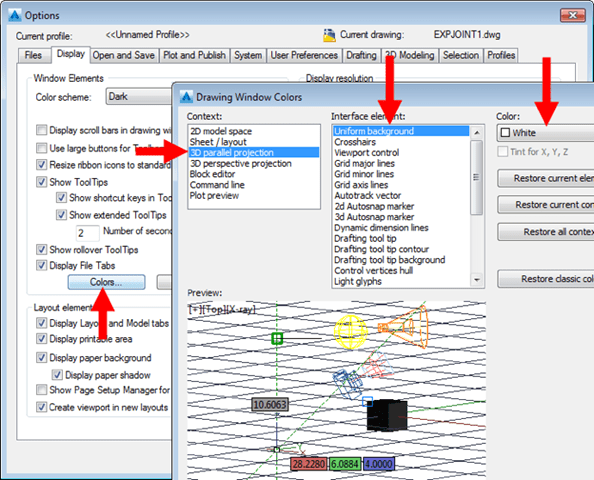
    Manually dim all the necessary and changing CAD environment into white background (or any color)

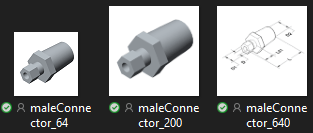
    Capture the image using an app like PicPick or Cropper to create three images with different sizes: maleConnector_64.png maleConnector_200.png maleConnector_640.png with size 64×64, 200×200, 640×640 accordingly

    PART CREATION

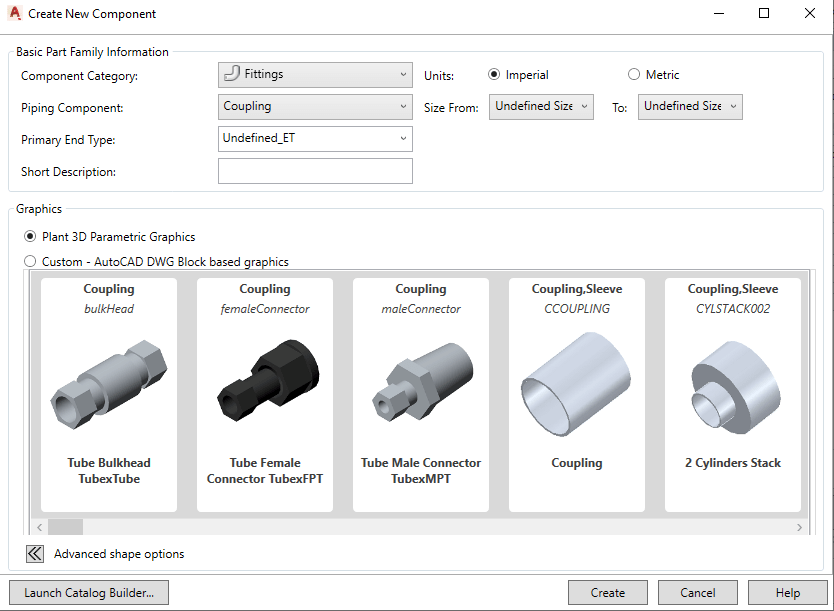
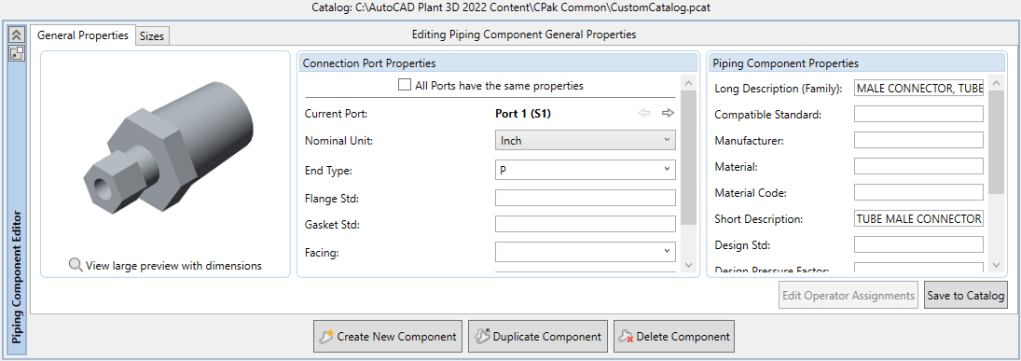
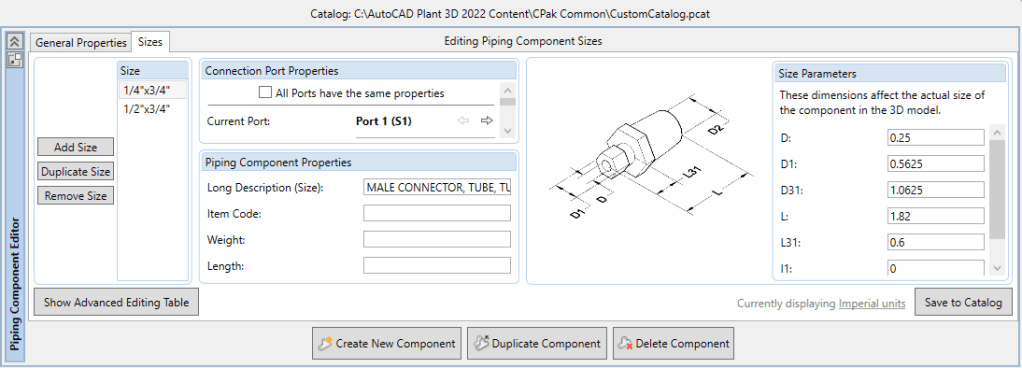
    Final step is to launch Spec Editor. Open an existing CustomCatalog (better than a whole new catalog using CatalogBuilder). Choose “Create New Component” and choosing our part by selecting the group (defined in script).

    Setting and save the catalog. Now it ready-to-use in Plant3D.

    See PART 3:

    https://enginine.com/2025/11/11/custom-python-scripts-for-autocad-plant-3d-case-study-of-tubing-fittings-script/

  • Custom Python Scripts for AutoCAD Plant 3D – Case study of tubing fittings – PART 1

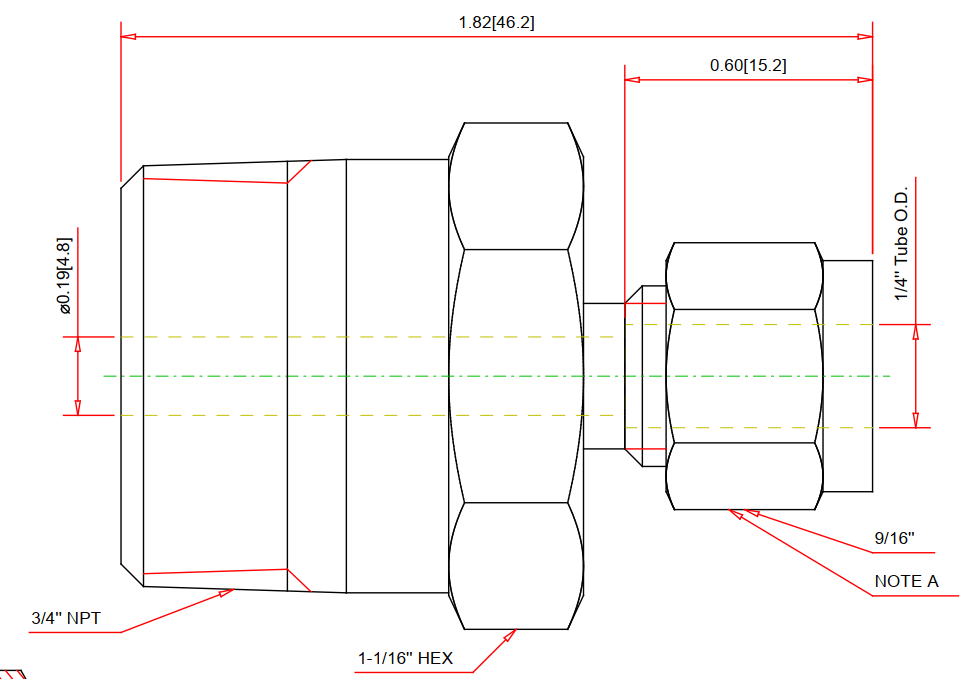
    Let’s try a simple male connector. First, we’ll grasp a drawing from Swagelok as reference:

    Coding

    We import libraris in the header, then define part’s principal dimensions which used to drive the entire model, serving as user inputs:

    from varmain.primitiv import *
    from varmain.custom import *
     
    @activate(Group="Coupling", TooltipShort="Tube Male Connector TubexMPT", TooltipLong="Tube Male Connector TubexMPT", FirstPortEndtypes="P", LengthUnit="in",  Ports="2")
    @group("MainDimensions")
    @param(D=LENGTH, TooltipShort="Tube OD", TooltipLong="Tube OD")
    @param(D1=LENGTH, TooltipShort="Hex head OD", TooltipLong="Fitting hex head OD")
    @param(D31=LENGTH, TooltipShort="Hex OD of Body", TooltipLong="Hex OD of Body")
    @param(L=LENGTH, TooltipShort="Length of Fitting", TooltipLong="Overall Length of Fitting")
    @param(L31=LENGTH, TooltipShort="Tube gland", TooltipLong="Tube gland length")
    @param(I1=LENGTH, TooltipShort="Tube insert", TooltipLong="Tube insert distance")
    @param(OF=LENGTH0)
    

    Define the function:

    def maleConnector(s, D=0.25, D1=0.5625, D31=1.0625, L=1.82, L31=0.6, I1=0, K=1, OF=0, **kw):
    

    As AutoCAD Plant 3D (PLNT3D) only accept a few primitives, we have to being creative in our coding part.

    Hex nut shape will be treat as a cylinder being trimmed by six cubes, then delete these cubes away:

        #hex head
        headStartangle = 0
        headBox1 = BOX(s, L=D1, W=D1, H=L32).translate((L32/2,0,1.866*D1/2)).rotateX(headStartangle) #cos(30deg) = 0.866
        headBox2 = BOX(s, L=D1, W=D1, H=L32).translate((L32/2,0,1.866*D1/2)).rotateX(headStartangle+60) #cos(30deg) = 0.866
        headBox3 = BOX(s, L=D1, W=D1, H=L32).translate((L32/2,0,1.866*D1/2)).rotateX(headStartangle+2*60) #cos(30deg) = 0.866
        headBox4 = BOX(s, L=D1, W=D1, H=L32).translate((L32/2,0,1.866*D1/2)).rotateX(headStartangle+3*60) #cos(30deg) = 0.866
        headBox5 = BOX(s, L=D1, W=D1, H=L32).translate((L32/2,0,1.866*D1/2)).rotateX(headStartangle+4*60) #cos(30deg) = 0.866
        headBox6 = BOX(s, L=D1, W=D1, H=L32).translate((L32/2,0,1.866*D1/2)).rotateX(headStartangle+5*60) #cos(30deg) = 0.866
        headBox1.uniteWith(headBox2)
        headBox1.uniteWith(headBox3)
        headBox1.uniteWith(headBox4)
        headBox1.uniteWith(headBox5)
        headBox1.uniteWith(headBox6)
        headBox2.erase()
        headBox3.erase()
        headBox4.erase()
        headBox5.erase()
        headBox6.erase()
    
        head1 = CYLINDER(s, R=D1/2, H=L32, O=0).rotateY(90)
        head1.subtractFrom(headBox1)
        headBox1.erase()
    

    After create other shapes, we combine them into one body:

        #joint 3 parts
        bodyMain.uniteWith(head1)
        bodyMain.uniteWith(head2)
        head1.erase()
        head2.erase()
    

    Create insert point and port points. As tube will penetrate these fittings in tubing port, we have to offset one port inwardy:

        #tube insert distance
        if I1 == 0:
            I1 = L31
        
        #set port points
        s.setPoint((0.0 + I1, 0.0, 0.0), (-1.0, 0.0, 0.0), 0)
        s.setPoint((L, 0.0, 0.0), (1.0, 0.0, 0.0), 0)
    

    Code Testing

    Choose Share Content folder by command MODIFYSHAREDCONTENTFOLDER or use default location (C:\AutoCAD Plant 3D 2016 Content\CPak Common\CustomScripts). Save script file at that location.

    Command PLANTREGISTERCUSTOMSCRIPTS to compiled the script. Load PnP3dACPAdapter.arx by arxload "PnP3dACPAdapter".

    Test the script by testacpscript "maleConnector".

    Note: If any modification, PLNT3D must be closed, then register script again.

    See PART 2: