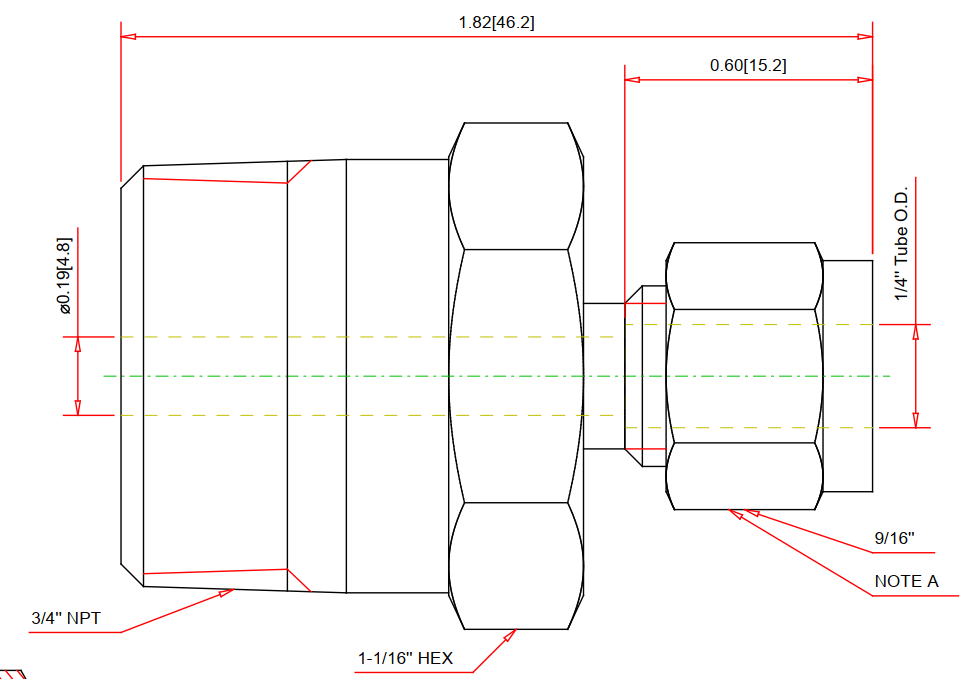
Let’s try a simple male connector. First, we’ll grasp a drawing from Swagelok as reference:
Coding
We import libraris in the header, then define part’s principal dimensions which used to drive the entire model, serving as user inputs:
from varmain.primitiv import *
from varmain.custom import *

@activate(Group="Coupling", TooltipShort="Tube Male Connector TubexMPT", TooltipLong="Tube Male Connector TubexMPT", FirstPortEndtypes="P", LengthUnit="in",  Ports="2")
@group("MainDimensions")
@param(D=LENGTH, TooltipShort="Tube OD", TooltipLong="Tube OD")
@param(D1=LENGTH, TooltipShort="Hex head OD", TooltipLong="Fitting hex head OD")
@param(D31=LENGTH, TooltipShort="Hex OD of Body", TooltipLong="Hex OD of Body")
@param(L=LENGTH, TooltipShort="Length of Fitting", TooltipLong="Overall Length of Fitting")
@param(L31=LENGTH, TooltipShort="Tube gland", TooltipLong="Tube gland length")
@param(I1=LENGTH, TooltipShort="Tube insert", TooltipLong="Tube insert distance")
@param(OF=LENGTH0)
Define the function:
def maleConnector(s, D=0.25, D1=0.5625, D31=1.0625, L=1.82, L31=0.6, I1=0, K=1, OF=0, **kw):
As AutoCAD Plant 3D (PLNT3D) only accept a few primitives, we have to being creative in our coding part.
Hex nut shape will be treat as a cylinder being trimmed by six cubes, then delete these cubes away:
    #hex head
    headStartangle = 0
    headBox1 = BOX(s, L=D1, W=D1, H=L32).translate((L32/2,0,1.866*D1/2)).rotateX(headStartangle) #cos(30deg) = 0.866
    headBox2 = BOX(s, L=D1, W=D1, H=L32).translate((L32/2,0,1.866*D1/2)).rotateX(headStartangle+60) #cos(30deg) = 0.866
    headBox3 = BOX(s, L=D1, W=D1, H=L32).translate((L32/2,0,1.866*D1/2)).rotateX(headStartangle+2*60) #cos(30deg) = 0.866
    headBox4 = BOX(s, L=D1, W=D1, H=L32).translate((L32/2,0,1.866*D1/2)).rotateX(headStartangle+3*60) #cos(30deg) = 0.866
    headBox5 = BOX(s, L=D1, W=D1, H=L32).translate((L32/2,0,1.866*D1/2)).rotateX(headStartangle+4*60) #cos(30deg) = 0.866
    headBox6 = BOX(s, L=D1, W=D1, H=L32).translate((L32/2,0,1.866*D1/2)).rotateX(headStartangle+5*60) #cos(30deg) = 0.866
    headBox1.uniteWith(headBox2)
    headBox1.uniteWith(headBox3)
    headBox1.uniteWith(headBox4)
    headBox1.uniteWith(headBox5)
    headBox1.uniteWith(headBox6)
    headBox2.erase()
    headBox3.erase()
    headBox4.erase()
    headBox5.erase()
    headBox6.erase()

    head1 = CYLINDER(s, R=D1/2, H=L32, O=0).rotateY(90)
    head1.subtractFrom(headBox1)
    headBox1.erase()
After create other shapes, we combine them into one body:
    #joint 3 parts
    bodyMain.uniteWith(head1)
    bodyMain.uniteWith(head2)
    head1.erase()
    head2.erase()
Create insert point and port points. As tube will penetrate these fittings in tubing port, we have to offset one port inwardy:
    #tube insert distance
    if I1 == 0:
        I1 = L31

    #set port points
    s.setPoint((0.0 + I1, 0.0, 0.0), (-1.0, 0.0, 0.0), 0)
    s.setPoint((L, 0.0, 0.0), (1.0, 0.0, 0.0), 0)
Code Testing
Choose Share Content folder by command MODIFYSHAREDCONTENTFOLDER or use default location (C:\AutoCAD Plant 3D 2016 Content\CPak Common\CustomScripts). Save script file at that location.
Command PLANTREGISTERCUSTOMSCRIPTS to compiled the script. Load PnP3dACPAdapter.arx by arxload "PnP3dACPAdapter".
Test the script by testacpscript "maleConnector".
Note: If any modification, PLNT3D must be closed, then register script again.
See PART 2:


Leave a comment